MECCHA CHAMELEON: Answer Check Time, friends, and lobby fixes
Seen the clips and trying to get a group in tonight? MECCHA CHAMELEON is easy to understand, but the first session can fall apart if friends buy the wrong platform, miss an update, get stuck outside the lobby, or do not know what Answer Check Time is showing after a round. Check platforms, invites, lobby fixes, and the round-review basics before the call goes quiet.
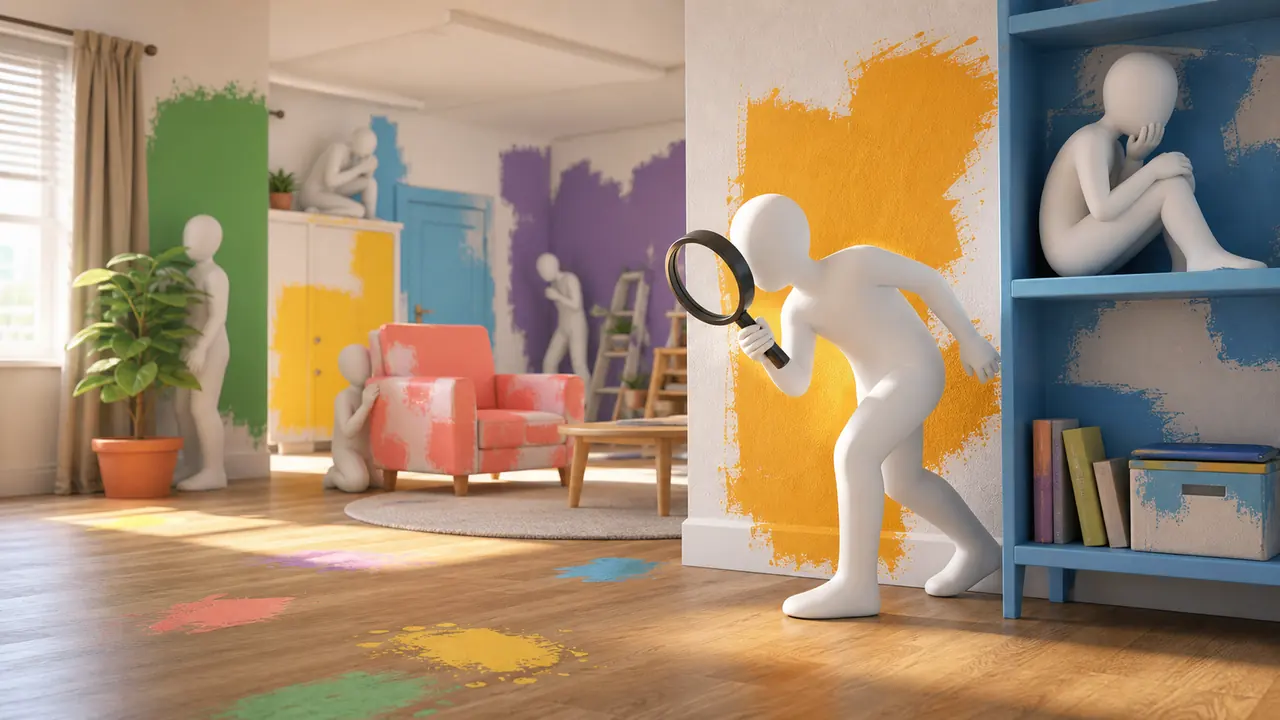
MECCHA CHAMELEON is a multiplayer hide-and-seek party game with a simple hook: Hiders paint their white bodies to look like part of the stage, then Seekers try to spot them before time runs out. The hiding spot matters. The pose matters. The paint matters. A good disguise feels clever. A bad one is still funny because everyone can see exactly why it failed.
It spread because the fun is visible right away. A friend can understand the rules in seconds, a streamer can involve viewers, and every round creates a joke you can read from the screen: someone either disappears into the room or stands there looking painfully obvious. That makes the game a better fit for friends who want quick laughs than for players looking for a serious competitive ladder.
The catch is setup. MECCHA CHAMELEON is at its best when everyone gets into the lobby quickly. If your group is still checking platforms, fighting invites, or asking whether a private room is working, the fun has not started yet. Solve that first-night friction before it steals the session.
Gameplay Look
MECCHA CHAMELEON screenshots that explain the game fast
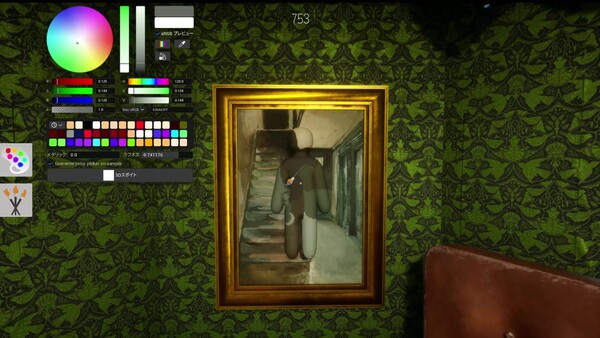
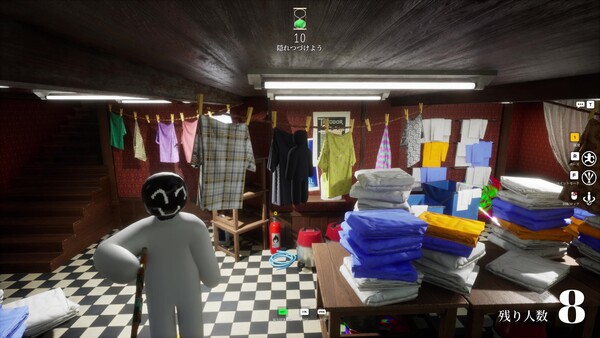
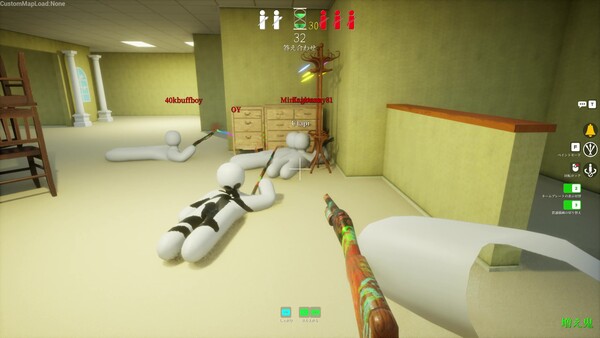
These official Steam screenshots are useful because they show the real loop: pick paint, read the room, and hide in a way that still looks believable from the Seeker's side. That is the part trailers make look easy and first matches make very obvious.
Paint is the mechanic.The color wheel is not cosmetic. It is how Hiders try to become part of the room.Busy rooms create better hiding spots.Clothes, furniture, shadows, and checker floors give Hiders more ways to break up their outline.Outline still matters.A close color match can fail if the body shape, pose, or lighting feels wrong.
If you are trying to decide whether MECCHA CHAMELEON works for tonight, start with the facts that affect the group. The official MECCHA CHAMELEON Steam page lists it as a Windows PC game from developer and publisher lemorion_1224, released on June 9, 2026. MECCHA CHAMELEON is an online hide-and-seek game with public matches, private room play, and streamer-friendly participation.
PlatformSteam / Windows PC
Best path for most players. Check Steam before planning around consoles or Mac.
Release dateJune 9, 2026
Steam lists this as the MECCHA CHAMELEON release date for the PC version.
Online playPublic + private rooms
Play online with public matches or private rooms for friends.
Players2-10 recommended
The maximum can depend on the host's network environment and future playtests.
PricePaid Steam game
Check Steam for the live price, discounts, and regional pricing before buying.
LanguagesEnglish + 11 more
Steam lists 12 supported interface/audio languages, including Japanese and Simplified Chinese.
Looking for MECCHA CHAMELEON on PS5, Xbox, Switch, Android, Mac, or mobile?
The safest answer is simple: plan around Steam on Windows PC. That is the platform clearly shown on the official MECCHA CHAMELEON store page, and Steam lists the PC release date as June 9, 2026. If your group has a mix of PC, Mac, Steam Deck, PS5, Xbox, Switch, Android, iPhone, or other mobile players, do not assume everyone can join MECCHA CHAMELEON until the current official listing is checked.
For a party game, platform confusion is not a small detail. If one friend buys the wrong version or sits in voice chat because their device is not supported, the group loses momentum. Treat the platform check as part of the setup. Before inviting everyone, confirm who is on Windows PC, who is using Steam, whether the room will be online, and whether anyone is trying to play through a console, phone, handheld, compatibility layer, or unsupported device.
Device question
Best current answer
What to do before game night
Steam / Windows PC
The clearest supported path.
Update Steam and the game before creating a room.
PS5 release date
Do not infer a PS5 release date from the PC Steam page.
Wait for an official PlayStation listing before planning a console group.
Xbox or Nintendo Switch
No console plan should be assumed from PC search results.
Use the official store page as the source of truth.
Android, iPhone, or mobile
Do not treat mobile search results, lookalike apps, or APK mirrors as confirmation.
Do not download a MECCHA CHAMELEON APK from unofficial sites; check official store listings first.
Mac
Do not assume native support.
Check the official Steam requirements before buying for a Mac user.
Steam Deck
Separate "can launch" from "comfortable to play."
Check input, text size, and lobby usability before hosting a group.
Online play
Steam describes public matches and private room play.
Use a private room for friends and confirm everyone is on the same version.
Player Signals
What players are actually running into
Read this part like a pre-game warning. Most early MECCHA CHAMELEON problems happen before the round starts: someone cannot join, someone missed an update, or the room loads forever while the voice chat goes quiet. The other big mistake happens inside the round: new Hiders trust color too much and forget that outline, light, and pose give them away.
Lobby reality
Friends can fail to join MECCHA CHAMELEON rooms.
Players report MECCHA CHAMELEON private rooms not appearing, invite clicks doing nothing, infinite loading, and being kicked back to the main menu. If it happens, stop cycling the same invite. Recreate the room, confirm everyone is on the same version, then try a different host.
Patch notes for fix 1.1.0 mention server connection fixes and warn that matchmaking only works between players on the same version. Before blaming the server, make everyone restart Steam and confirm the latest update is applied.
MECCHA CHAMELEON friend invites are useful, but stale invites can mislead you.
The Steam Community feed lists a ver1.2.1 update that added a friend invitation feature. If a friend is clicking an old invite after a crash or room remake, send a fresh one instead of debugging the wrong lobby.
Color alone will not hide you in MECCHA CHAMELEON.
Player tips keep coming back to the same lesson: the right color still looks wrong if the lighting, roughness, body outline, or pose does not match the room. After painting, rotate the camera and judge your disguise from the Seeker's angle.
That is the order a real group needs: get everyone into the room, make sure the version matches, send clean invites, then worry about clever hiding. A player who can enter a room, stay connected, and understand why a disguise looks wrong is closer to having fun than a player with a dozen generic tips.
Friend Setup
How to play MECCHA CHAMELEON with friends
Before your group creates a room, do the unglamorous part. Ask everyone to update the game, restart Steam, and launch the same build. Pick one host with the most stable connection. If that person has been crashing or getting loading loops, choose someone else. A party game should not begin with fifteen minutes of silent menu troubleshooting.
Update first.Version mismatch can create multiplayer issues, so every player should update before joining.
Choose a stable host.The host's network matters, especially when the room is full or the match uses viewer participation.
Create a private room.Use a clear room name and privacy setting if the session is for friends only.
Send a fresh invite.Old invites can become useless after a crash, restart, or new room creation.
Confirm before starting.Make sure everyone is in the same lobby before changing settings or launching the round.
If a recent update added or changed friend invites, use the newest flow first. If the invite fails, do not keep clicking the same broken invitation. Recreate the room, send a clean invite, and check whether the player who cannot join has a stale Steam state or a different game version.
Troubleshooting
Fix MECCHA CHAMELEON lobby issues
Most early MECCHA CHAMELEON frustration is not about the rules. It is about getting into the same match. Steam community discussions show players asking about private rooms, loading loops, crashes, server names, and friend join problems. If you are already in a call with friends waiting, start with the symptom that matches what you see.
Symptom
Likely cause
Try first
Friend cannot see the room
Room privacy, refresh delay, wrong room name, or version mismatch.
Recreate a private room with a simple name and send a fresh invite.
Stuck on loading
Bad host session, stale invite, network hiccup, or post-crash state.
Restart the game and Steam, then test a different host.
Invite does nothing
Steam state, old room, or game version mismatch.
Remove old invites, update everyone, and send a new invite after room creation.
Crash after painting
Graphics, driver, or a game-side bug after using paint tools.
Restart cleanly, reduce graphics pressure, and check recent discussions or patch notes.
No sound
Wrong Windows output device, muted app volume, headset switching, Steam audio state, or driver conflict.
Check the volume mixer and output device first, then restart the game and verify files.
Public server feels unreliable
Full rooms, host instability, or public-room churn.
Use a private room for friends instead of relying on random public listings.
The boring order is usually the fastest order: restart the game, restart Steam, confirm the latest update, recreate the room, send a fresh invite, and test a different host. It is not glamorous, but it keeps the night moving. The game is funniest when people are hiding badly, not when they are diagnosing menus.
If MECCHA CHAMELEON has no sound, start outside the game before chasing rare fixes. Make sure Windows has the right speaker or headset selected, open the volume mixer to confirm MECCHA CHAMELEON is not muted, unplug and reconnect Bluetooth audio if it changed mid-session, then restart Steam and the game. If sound is still missing, verify the game files and update the audio driver before asking the group to wait.
Round Review
What is Answer Check Time in MECCHA CHAMELEON?
Answer Check Time is the post-search reveal moment. After the hiding and seeking phase ends, use it to see where hiders were hiding, which spots seekers missed, and why a disguise worked or failed. It is not just a scoreboard pause; it is the fastest way to learn the room.
If you are trying to understand what the game is showing, look for three things during Answer Check Time: the hider's final position, the paint color they chose, and whether their outline or pose still looked natural from the Seeker's side. A spot that survives Answer Check Time is worth remembering for the next round.
Review missed hiding spots.Notice corners, furniture, shadows, or busy floor patterns that fooled Seekers.
Check the paint and pose together.A good color still fails if the body shape, brightness, or stance looks wrong.
Use it before the next match.Copy the idea, not only the exact spot, because room layout and Seeker routes can change.
First Match
MECCHA CHAMELEON first-match basics
MECCHA CHAMELEON splits players into Hiders and Seekers. Hiders try to survive by blending into the stage until the timer runs out. Seekers try to find every Hider in time. That sounds simple, but the first match teaches one important lesson: copying one color is not the same as disappearing.
As a Hider, start by choosing the scene, not the paint. Look for an area where a human-shaped outline can make sense. Then paint toward the light and texture of that spot. A body that matches the wall color but ignores shadow still looks wrong. A pose that fits the environment can do more than one perfect color. The game rewards players who think about silhouette, lighting, and where Seekers naturally look first.
Before the hunt starts, rotate the camera and check yourself like a Seeker would. Look for white gaps around elbows or legs, a glossy patch on a matte wall, a shadow that points the wrong way, or a pose that no object in the room would make. If you only judge the paint from your own view, your disguise can look better to you than it does to everyone else.
As a Seeker, reverse that logic. Do not stare only at color. Look for shapes that interrupt the room, objects that repeat almost correctly, corners with odd outlines, and surfaces where the brightness feels wrong. Good Hiders almost blend in, but something usually looks a little off. Your job is to find that part.
After the round, use Answer Check Time as feedback rather than a dead pause. The reveal can show why a hiding spot worked, which angle exposed a player, and what your group should try in the next match.
Early Advantage
Hider and Seeker tips that actually help early
Hider tips
Pick the hiding spot before you start painting.
Match lighting and shadow, not just the average wall color.
Use a pose that belongs in the scene.
Avoid the obvious "clever" spot everyone checks first.
Stop moving once your disguise is good enough.
Seeker tips
Search for outline first and color second.
Check corners, edges, and repeated objects.
Look for bodies that match color but not brightness.
Return to suspicious areas after the first scan.
Trust movement, but do not depend on it.
Map-specific hiding spots help once you know the rooms, but early players need principles first. If you understand outline, lighting, pose, and where Seekers look first, almost every spot gets better. Screenshots can come later; the first win is not looking out of place.
More Content
Maps, mods, and updates
MECCHA CHAMELEON has Steam Workshop activity, so maps and custom content can become a reason to return after the first night. New maps change hiding logic. New updates can change lobby behavior. Workshop content can add variety once your group already understands the basic loop.
For a first session, keep the setup clean. Play the standard game before adding Workshop variables. If the group cannot join a normal room, mods will make troubleshooting harder. After everyone understands Hider and Seeker roles, Workshop maps and community content become much more useful.
MECCHA CHAMELEON is a multiplayer hide-and-seek game where Hiders paint themselves to blend into a stage while Seekers try to find them before time runs out.
Is MECCHA CHAMELEON free or paid?
MECCHA CHAMELEON is a paid Steam game. Prices, discounts, and regional pricing can change, so check Steam for the current price before buying.
Is there a MECCHA CHAMELEON APK for Android?
Do not download a MECCHA CHAMELEON APK from unofficial sites. Use the official Steam listing and trusted store pages to confirm supported platforms before installing anything.
Can you play MECCHA CHAMELEON online?
Yes. MECCHA CHAMELEON is an online hide-and-seek game on Steam with public matches and private room play. For friends, use a private room and make sure everyone is on the same version.
How many players can play MECCHA CHAMELEON?
The official Steam page recommends 2 to 10 players. The actual room experience can depend on the host's network and future playtests.
How do you play MECCHA CHAMELEON with friends?
Update the game, choose a stable host, create a private room, send a fresh invite or room details, and confirm everyone is on the same version before starting.
Can you play MECCHA CHAMELEON on PS5, Xbox, Switch, Android, Mac, or mobile?
The reliable current path is Steam on Windows PC. Do not assume PS5, Xbox, Switch, Android, iPhone, mobile, or Mac support unless the official store listing confirms it.
What is the MECCHA CHAMELEON release date?
The Steam store lists MECCHA CHAMELEON with a June 9, 2026 release date. Console or mobile release dates should not be assumed from the PC listing.
Why can't I join my friend's MECCHA CHAMELEON lobby?
The common causes are version mismatch, stale invites, room visibility, password mistakes, Steam online state, loading loops, or a weak host session.
What is Answer Check Time in MECCHA CHAMELEON?
Answer Check Time appears after the search phase. It is the reveal moment where players can see hider positions, review spots seekers missed, and learn which paint, pose, or corner worked. Use it before the next match to improve your hiding and searching.
How do you see where players were hiding?
Watch Answer Check Time after the search phase. It shows the hiding spots and makes it easier to understand whether a player won because of paint color, room clutter, pose, lighting, or a missed search route.
Why does MECCHA CHAMELEON have no sound?
Check the Windows volume mixer, the active output device, Steam audio state, headset switching, and in-game settings first. Then restart the game, verify files, and update audio drivers if the issue stays.
Is this the official MECCHA CHAMELEON site?
No. This is an independent guide for players. The game is developed and published by lemorion_1224. This site is not affiliated with lemorion_1224, Steam, or Valve.